Best 2-in-1 Laptops 2026
The best convertible laptops of 2026, from dual OLED workstations to slim Copilot+ tablets, with picks at every budget. Expert picks, pros and cons, and side...
As an Amazon Associate we earn from qualifying purchases made through our links — this doesn't affect our picks.

ASUS Zenbook Duo (2025) UX8406CA Dual 14in 3K OLED Laptop, Core Ultra 9 285H, 32GB, 1TB
Our top recommendation for this category
Price as of May 20, 2026 — see current price on Amazon.
The 2-in-1 laptop market hit an inflection point this year. OLED touchscreens that used to cost $1,800 now start at $900, Intel's Lunar Lake and Panther Lake chips genuinely extended battery life rather than just claiming to, and Copilot+ PC certification finally means something beyond a marketing badge. This guide pulls together six months of published reviews and spec sheets, and the spread of options is better than it's ever been.
Quick Picks
| Laptop | Price | Display | CPU | Battery | Best For | |
|---|---|---|---|---|---|---|
| ASUS Zenbook Duo (2025) | ~$2,100 | 2x 14in 3K OLED | Core Ultra 9 285H | 75Wh battery | Power users / multitaskers | Check Price |
| HP OmniBook Ultra Flip | ~$1,820 | 14in 3K OLED | Core Ultra 7 258V | 12 hrs | Style-conscious buyers | Check Price |
| Microsoft Surface Pro 11 | ~$1,000 | 13in OLED | Snapdragon X Elite | 14 hrs | Tablet-first users | Check Price |
| Lenovo Yoga 7 2-in-1 | ~$900 | 14in OLED | Ryzen AI 7 350 | 11 hrs | Budget OLED seekers | Check Price |
ASUS Zenbook Duo (2025) - Best Overall for Multitaskers
ASUS Zenbook Duo (2025) UX8406CA Dual 14in 3K OLED Laptop, Core Ultra 9 285H, 32GB, 1TB
Pros
- Two full 14-inch 3K 120Hz OLED touchscreens, genuinely useful rather than a gimmick
- Intel Core Ultra 9 285H with 32GB RAM handles heavy multitasking easily
- Detachable Bluetooth keyboard and a stylus in the box
Cons
- Battery drains much faster with both screens active
- Heavier than a typical 14-inch ultrabook once the keyboard is on
- The 285H's NPU falls short of Copilot+ PC certification
Price as of May 20, 2026 — see current price on Amazon.
The Zenbook Duo is the one laptop in this roundup that makes you rethink how you work. Two 14-inch 3K OLED touchscreens (2880x1800, 120Hz each) sit stacked in a clamshell design, with a detachable Bluetooth keyboard that can sit on the lower screen or out in front of the machine. Prop it up on its kickstand with both displays stacked and you have a compact dual-monitor setup that fits in a backpack.
The 2025 refresh (model UX8406CA-PS99T) moves to Intel's Core Ultra 9 285H with 32GB of LPDDR5X and a 1TB SSD. That's an H-series chip, so it has more multithreaded headroom than the Lunar Lake processors in the slimmer convertibles here. Reviewers broadly agree that the dual-display concept works for productivity: a browser on one screen and a spreadsheet on the other feels genuinely different from flipping between virtual desktops.
Portability is the tradeoff. Running both OLED panels from the 75Wh battery cuts runtime well below single-screen use, and the keyboard adds weight on top of the base unit. The Core Ultra 9 285H also lacks a 40-TOPS NPU, so it misses Copilot+ features like Recall. For most dual-screen buyers, that matters far less than the second display.
ASUS sells this exact configuration at $2,299.99 on its own store, so the Amazon price sits below list. Who should buy it: anyone who splits their day across multiple windows and wants something more elegant than a dual-monitor desk setup. Content creators, developers, financial analysts. Not a great road-warrior pick if you need 10+ hours away from a charger.
HP OmniBook Ultra Flip 14 - Best Design
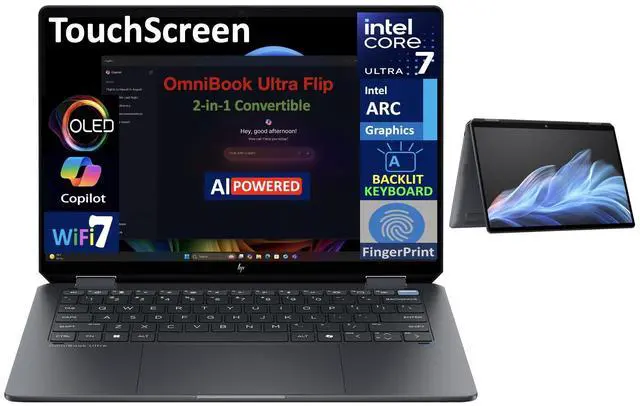
HP OmniBook Ultra Flip 14in 3K OLED 2-in-1 Laptop
Pros
- 3K OLED display (2880x1800) at 120Hz with 500 nits SDR, 1,100 nits HDR
- Intel Core Ultra 7 256V is power-efficient and fast for light-to-medium loads
- Two Thunderbolt 4 ports, Wi-Fi 7, fingerprint reader: nothing missing
Cons
- HP rebranded this from Spectre x360, so some older accessories won't fit
- 59Wh battery is smaller than the Zenbook Duo's 75Wh
- Active Pen not included in base config
Price as of May 20, 2026 — see current price on Amazon.
The HP OmniBook Ultra Flip is the one you'd want to carry to a client meeting. HP's gem-cut chassis design with angled chamfered corners is legitimately distinctive, and at 2.9 lbs it's far easier to carry all day than the dual-screen Zenbook Duo.
The card links the Core Ultra 7 258V, 32GB/1TB configuration, a step up in both spec and price from the 256V base model this section describes. Compare it against HP's own configurator before you buy, since HP's direct price for this spec has run well below Amazon's.
HP rebranded the Spectre x360 14 to OmniBook Ultra Flip in 2025 as part of a broader lineup overhaul. The internal changes matter more than the name change: the Core Ultra 7 256V (Lunar Lake) replaces the older Core Ultra 5 125H, and Wi-Fi 7 is now standard. Tom's Hardware tested this and came away impressed with the performance-per-watt on the 256V chip.
The 3K OLED display (2880x1800) at 120Hz is class-competitive with the best panels here. You get 500 nits SDR and up to 1,100 nits HDR peak. Color accuracy is excellent, with reviews noting 100% DCI-P3 coverage. The 59Wh battery is on the small side, but real-world battery life comes in around 11-13 hours for mixed use, which is still excellent.
One thing to know: HP sells several OmniBook variants now (OmniBook Ultra, OmniBook X). Make sure you're looking at the Ultra Flip 14 specifically for the 3K OLED and Thunderbolt 4.
Microsoft Surface Pro 11 - Best Tablet Experience

Microsoft Surface Pro 11 Copilot+ PC 13in OLED
Pros
- Genuine tablet experience at 1.97 lbs without keyboard attached
- Snapdragon X Elite delivers 14-hour real-world battery life
- 3:2 aspect ratio OLED display is ideal for reading and note-taking
Cons
- Keyboard cover sold separately ($179+ adds real cost)
- Snapdragon X Elite still has app compatibility gaps vs x86
- 13-inch screen feels small for heavy document work
Price as of May 20, 2026 — see current price on Amazon.
Watch the seller here. Amazon's listing was well above Microsoft's $999 list at $1,467.20 when we checked on September 5, 2026, so do not pay that. Buy at list when stock returns or check Microsoft and Best Buy directly.
The Surface Pro 11 occupies a different category than the other picks here. It's a tablet first, laptop second. At 1.97 lbs without the keyboard cover, you'd carry it differently, hold it differently, and use it differently than a traditional clamshell 2-in-1.
Snapdragon X Elite is the chip that finally makes this form factor work well. Microsoft's own benchmarks show 14 hours of battery life, and third-party tests from reviewers like NotebookCheck land between 12-15 hours depending on load. ARM app compatibility has improved a lot since the first Snapdragon X devices launched. Most major productivity apps run natively now, and Rosetta-style emulation handles the rest.
The 13-inch 3:2 OLED display (2880x1920) is the right aspect ratio for this device. Taller than widescreen, it's great for documents, PDFs, and web browsing in tablet mode. The Slim Pen 2 (sold separately or in bundles) supports 4,096 pressure levels and haptic feedback that simulates pen texture on glass. If you use your laptop for handwritten notes, sketches, or annotation-heavy workflows, this is worth serious consideration.
There is a catch: the Type Cover keyboard is not cheap ($179-$229 depending on model), and you need it for serious laptop use. Factor that into your budget. The $999 base price gets you a Snapdragon X Plus model with 256GB storage, which is a pretty tight SSD if you work with large files.
Lenovo Yoga 7 2-in-1 - Best Value
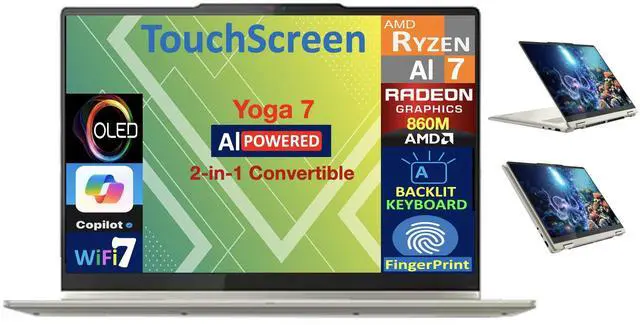
Lenovo Yoga 7 2-in-1 14in OLED Copilot+ PC
Pros
- OLED 14-inch touchscreen at under $900 is exceptional value
- AMD Ryzen AI 7 350 with Radeon 860M handles gaming and creative loads
- Wi-Fi 7, 16GB RAM, Yoga Pen included at base price
Cons
- WUXGA (1920x1200) resolution is lower than pricier OLED rivals
- Build quality is a step below the pricier picks' premium metal finishes
- AMD Radeon 860M iGPU trails Intel Arc graphics in some creative benchmarks
Price as of May 20, 2026 — see current price on Amazon.
One caveat on price: Amazon's listing was well above list at $1,295.00 when we checked on September 5, 2026, so do not pay that. The value case below assumes the $899 list price, and it falls apart at marketplace markup.
The Yoga 7 is what makes 2026 a good year to buy a 2-in-1 at the mid-range. An OLED touchscreen, AMD's Ryzen AI 7 350 with Copilot+ certification, Wi-Fi 7, and Yoga Pen in the box for around $899. A few years ago this config would cost $1,400.
Display resolution is WUXGA (1920x1200) rather than the 2.8K or 3K panels on the pricier options. On a 14-inch screen, the difference is real but not dramatic. You'll notice it if you sit them side by side, not much in daily use. The OLED panel still delivers true blacks and excellent color that IPS can't match.
AMD's Ryzen AI 7 350 (Krackan Point architecture) has 50 TOPS of NPU performance, which clears the Copilot+ requirement and unlocks Microsoft's AI features. The Radeon 860M integrated graphics can handle light gaming at 1080p, and published benchmarks show Fortnite at 60+ fps on medium settings. Gaming isn't the point of a 2-in-1, but it's a real differentiator over Intel Arc graphics at similar thermal budgets.
Battery life comes in around 10-12 hours in mixed use. The keyboard is solid for a $900 machine, and Lenovo includes the Yoga Pen, which is a nice touch at this price. If you don't need the absolute best OLED panel or ARM-based battery life, this is the one to get.
What to Look for in a 2-in-1 Laptop
Convertible vs. Detachable: Which Form Factor Fits You?
Traditional convertibles (the Yoga 7 and OmniBook Ultra Flip) have a 360-degree hinge that folds the keyboard behind the display in tablet mode. The keyboard is always attached. Detachables (the Surface Pro) separate entirely, making them better tablets but requiring you to manage the keyboard separately. The Zenbook Duo is its own category: two screens and a keyboard that comes off.
Convertibles feel more laptop-like 90% of the time. Detachables feel more tablet-like 90% of the time. Pick based on which 90% matters more to you.
OLED vs. IPS: The Display Question
Every product in this roundup uses OLED, which wasn't the case even two years ago. OLED delivers true blacks (infinite contrast ratio), faster pixel response, and better color accuracy than IPS. The tradeoff is a risk of image retention (burn-in) over years of static content, and slightly lower maximum sustained brightness for SDR content.
For a laptop you'll use in varying lighting conditions, the HDR peak brightness specs matter more than SDR brightness. 1,100 nits HDR means the display can punch through ambient light when it needs to.
Battery Life Reality Check
Manufacturers test battery life under controlled conditions. PCMark 10 Modern Office, video playback tests, and web browsing tests all return different numbers. A video playback figure at moderate brightness is always the flattering one, and real-world mixed use lands well below it.
For a 2-in-1 you plan to use in both laptop and tablet modes, look for a battery above 60Wh. Dual-screen machines like the Zenbook Duo need every bit of their 75Wh. The Surface Pro 11 manages excellent battery despite a smaller cell because Snapdragon's ARM architecture draws dramatically less power at idle.
Stylus Support and Pressure Sensitivity
If you sketch, annotate documents, or take handwritten notes, check whether a stylus is included. The Surface Slim Pen 2 (4,096 pressure levels + haptics) and Lenovo Slim Pen (4,096 pressure levels) are the best-in-class options. The ASUS Stylus bundled with the Zenbook Duo is functional but less refined.
Pressure levels matter most for drawing and illustration. For note-taking, 2,048 levels is plenty. If you're buying a 2-in-1 specifically for digital art, the Surface Pro 11 with Slim Pen 2 is the best combo here.
The Copilot+ PC Question
Three of the four picks in this guide meet Microsoft's Copilot+ PC requirements (40+ TOPS of NPU performance). The Zenbook Duo's Core Ultra 9 285H does not. In practice, this unlocks features like Recall, live captions with real-time translation, and AI-powered photo and video tools in Windows 11. How much you'll use these features depends on your workflow. For most buyers, the underlying hardware performance matters more than the Copilot+ badge itself.
Frequently asked questions
- What is the difference between a 2-in-1 and a regular laptop?
- A 2-in-1 laptop has a 360-degree hinge or detachable design that lets it function as both a laptop and a tablet. A convertible 2-in-1 folds the keyboard behind the display; a detachable 2-in-1 like the Surface Pro separates the keyboard entirely. Regular laptops lack touchscreens and hinged designs that allow tablet mode.
- Are 2-in-1 laptops good for college students?
- Yes, particularly for students who take handwritten notes or annotate PDFs. The Lenovo Yoga 7 2-in-1 at around $899 with OLED, Wi-Fi 7, and Yoga Pen is a strong value pick. For students who primarily type, a regular laptop often delivers more performance per dollar. The convertible form factor shines for reading textbooks and studying in tablet mode.
- Can 2-in-1 laptops handle gaming?
- Light gaming, yes. The Lenovo Yoga 7's AMD Radeon 860M handles Fortnite and Valorant at 1080p medium settings around 60-80 fps. None of these picks are gaming laptops. If gaming is a priority, look at the ASUS ROG Flow X13 or Z13, which are purpose-built gaming 2-in-1s with discrete GPUs.
- How long do 2-in-1 laptops last?
- The same as regular laptops: 4-6 years for typical use before performance feels dated, longer if you don't push the hardware. OLED displays carry a small burn-in risk over long ownership, though modern panels have improved burn-in resistance significantly. Any laptop battery will degrade over time. Expect 70-80% capacity after 3 years of daily use.
- Is the Microsoft Surface Pro 11 worth it without a keyboard?
- Depends on use case. As a standalone tablet for reading, drawing, and media consumption, yes. For actual laptop work, no. You need the Type Cover keyboard, which adds $179-$229. Budget for the bundle from the start. Some Amazon listings include the keyboard, which brings the effective cost closer to $1,200-$1,300 for a complete system.
- What is the best 2-in-1 laptop under $1,000?
- The Lenovo Yoga 7 2-in-1 at around $899 is the strongest pick under $1,000. OLED touchscreen, AMD Ryzen AI 7 350, Wi-Fi 7, and Yoga Pen included. The Microsoft Surface Pro 11 base model starts at $999 but you'll need a keyboard separately. The Yoga 7 gives you a complete system at the better price.
Bottom Line
The ASUS Zenbook Duo (2025) is the pick if you want the most capable 2-in-1 here: two full 3K OLED screens, a Core Ultra 9 285H and 32GB of RAM, at a price below ASUS's own list. The HP OmniBook Ultra Flip wins on style and is the better everyday carry if you don't need a second screen. Pick the Surface Pro 11 if you spend more time reading and drawing than typing. And if $900 is your ceiling, the Yoga 7 2-in-1 delivers OLED and Copilot+ at a price that would have been unthinkable two years ago.
How We Pick
We pick products by combining spec-level research, price checks, trusted third-party benchmarks, and owner sentiment from high-signal sources.
- Performance and real-world value in the category this guide targets
- Price-to-performance and deal consistency over recent pricing windows
- Build quality, reliability patterns, and known long-term issues
- Recommendation refresh cadence to keep these picks current
Author
TheTechSearch Editorial Team
Independent product reviewers & PC builders
We compare real-world specs, reviews and owner reports, price trends, and user feedback to recommend gear that actually makes sense to buy.