Best RTX 5080 Prebuilt Gaming PCs 2026
The RTX 5080 is the sweet spot for serious 4K gaming. These are the best prebuilt desktops packing NVIDIA's Blackwell powerhouse. Expert picks, pros and cons...
As an Amazon Associate we earn from qualifying purchases made through our links — this doesn't affect our picks.
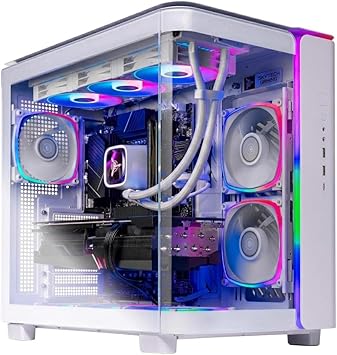
Skytech King 95 Gaming PC Ryzen 7 9850X3D, GeForce RTX 5080 16GB, 32GB DDR5 6000, 2TB Gen4 NVMe, 360mm AIO
Our top recommendation for this category
Price as of Aug 15, 2026 — see current price on Amazon.
The RTX 5080 hit a strange sweet spot in NVIDIA's Blackwell lineup. It's cheaper than the 5090 by a significant margin, yet it handles 4K gaming at high refresh rates better than anything from the previous generation. If you've been waiting for a prebuilt that doesn't force you to choose between overkill spending or GPU compromises, 2026 is finally delivering the goods.
The RTX 5080 prebuilt market has improved a lot. A year ago, most of these builds came with underwhelming CPUs stuffed in to keep the sticker price digestible. That's changed. Brands are now pairing the 5080 with AMD's 9800X3D and 9850X3D and Intel's Core Ultra 9 processors, and the results show.
| Product | CPU | RAM | Storage | Price | |
|---|---|---|---|---|---|
| Skytech King 95 | Ryzen 7 9850X3D | 32GB DDR5 6000 | 2TB Gen4 NVMe | $3,699.99 | Check Price |
| iBUYPOWER Y40 PRO Black | Core Ultra 9 285 | 32GB DDR5 | 2TB NVMe | $2,499 | Check Price |
| STORMCRAFT Phantom | Ryzen 7 9800X3D | 32GB DDR5 | 2TB NVMe | $3,099 | Check Price |
| Skytech O11 Vision | Ryzen 7 9850X3D | 64GB DDR5 | 4TB NVMe | $4,699 | Check Price |
Skytech King 95 (Ryzen 7 9850X3D)
The Skytech King 95 is, for most people, the one to buy. It pairs AMD's Ryzen 7 9850X3D with an RTX 5080 16GB, 32GB of DDR5-6000 and a 2TB Gen4 NVMe drive, and Skytech cools the CPU with a 360mm ARGB AIO rather than a tower air cooler. An 850W 80+ Gold ATX 3 power supply clears NVIDIA's recommendation for the 5080 with room to spare.
The 9850X3D matters here. AMD's 3D V-Cache architecture does things in gaming that raw clock speed comparisons don't show on paper. Frame times are tighter, stutters are rarer, and in CPU-limited scenarios you'll notice it. The 9850X3D runs slightly higher clocks than the 9800X3D, and paired with the 5080's Blackwell architecture you've got a machine that stays above 100fps in 4K across most titles.
Price check: Skytech lists this exact configuration at $3,599.99 on its own site, and Amazon has it within a few percent of that. The 2TB NVMe fills up faster than you'd hope, since modern game installs are enormous, so plan for a second drive if you keep a broad library. Wi-Fi is the older Wi-Fi 5 standard, which is fine for most homes but worth knowing if you game wirelessly.
Skytech King 95 Gaming PC Ryzen 7 9850X3D, GeForce RTX 5080 16GB, 32GB DDR5 6000, 2TB Gen4 NVMe, 360mm AIO
Pros
- 9850X3D delivers top-tier gaming CPU performance
- 360mm AIO and 850W Gold ATX 3 PSU included
- Priced close to Skytech's own list for this configuration
Cons
- 2TB fills up quickly with modern game libraries
- Wi-Fi 5 rather than Wi-Fi 6E or 7
Price as of Aug 15, 2026 — see current price on Amazon.
iBUYPOWER Y40 PRO Black
If you're budget-conscious within the RTX 5080 tier, iBUYPOWER's Y40 PRO Black at $2,499 is the entry point. It's using Intel's Core Ultra 9 285 instead of the 9800X3D, which is a meaningful difference in gaming specifically. The 285 is an excellent all-around processor and handles content creation, streaming, and multitasking exceptionally well. But in pure gaming benchmarks, the 9800X3D's 3D V-Cache edge shows.
That said, the gap is less dramatic when the RTX 5080 is doing most of the work. At 4K resolution the GPU is almost always the limiting factor, and the iBUYPOWER delivers nearly identical GPU-bound performance to the pricier options above. Where the Intel chip falls behind is in CPU-heavy or lower-resolution scenarios.
The Y40 PRO has a clean, minimal black aesthetic that doesn't scream "gamer PC." If you care about how your setup looks in a living room or streaming background, that counts for something. And at $2,499 it's the most accessible way into RTX 5080 territory.
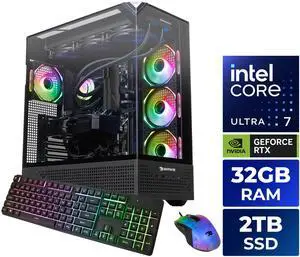
iBUYPOWER Y40 PRO Black Gaming PC Desktop Intel Core Ultra 9 285, GeForce RTX 5080 16GB, 32GB DDR5, 2TB NVMe (Y40BI9N5801)
Pros
- Lowest price entry into RTX 5080 prebuilts
- Core Ultra 9 285 handles streaming and multitasking brilliantly
- Clean minimal aesthetic, not aggressively gamer-styled
Cons
- Core Ultra 9 285 trails Ryzen 9800X3D in gaming-specific workloads
- Intel platform has less headroom for CPU upgrades than AM5
Price as of Aug 15, 2026 — see current price on Amazon.
STORMCRAFT Phantom
STORMCRAFT is one of the newer names in prebuilt gaming desktops, but they've put together a legitimate build here. The Phantom pairs a Ryzen 7 9800X3D with the RTX 5080, includes 32GB DDR5 at 6000MHz, and throws in a 360mm AIO liquid cooler. For $3,099, you're getting that liquid cooling without paying for it as an upgrade.
Why does the cooler matter? The 9800X3D runs warm under sustained load, and air coolers can hold it back in long gaming sessions or if you push it in productivity workloads. A 360mm AIO keeps temps in check and gives the CPU more sustained performance headroom. Product photos show clean cable management and an ARGB setup that's tasteful rather than overdone.
The main knock against STORMCRAFT is name recognition. If you're the type who wants to buy from a brand with decades of prebuilt history, you might prefer Skytech or iBUYPOWER. But on paper and in reported owner experiences, the Phantom holds up.

STORMCRAFT Phantom RTX 5080 Gaming PC Ryzen 7 9800X3D 32GB DDR5 2TB SSD 360mm AIO
Pros
- 360mm AIO included keeps 9800X3D cool under sustained load
- Competitive pricing for 9800X3D plus liquid cooling combo
- Clean ARGB build with good cable management
Cons
- Less established brand with shorter support history
- No standout differentiator beyond the AIO cooling
Price as of Aug 15, 2026 — see current price on Amazon.
Skytech Gaming O11 Vision
This is the one you buy when you want to stop thinking about your PC for the next five years. The Skytech O11 Vision tops out at $4,699, and while that's a lot of money, the spec sheet backs it up. You're getting a Ryzen 7 9850X3D (a step up from the 9800X3D with slightly higher clock speeds), 64GB of DDR5 at 6000MHz, a 4TB Gen4 NVMe SSD, an X870 motherboard with solid expansion options, Wi-Fi 7, and a 360mm ARGB AIO cooler. All in a Lian Li O11 Dynamic Evo case, which is one of the best-looking and most functional mid-towers available.
The 9850X3D over the 9800X3D is a modest bump. You won't feel it in most games. But 64GB of RAM is genuinely useful if you stream, run virtual machines, or keep a lot of tabs open alongside gaming. And 4TB of NVMe storage means you won't be uninstalling games every few months. These details stack up over a long ownership period.
The O11 Vision is also the only system here with Wi-Fi 7 out of the box, which matters if you're running a wireless setup. And the case allows for easy GPU and RAM upgrades down the road.

Skytech Gaming O11 Vision Gaming PC Ryzen 7 9850X3D RTX 5080 64GB DDR5 6000 4TB Gen4 NVMe Wi-Fi 7 X870
Pros
- 9850X3D CPU, 64GB DDR5, 4TB SSD means no upgrade pressure for years
- Lian Li O11 case is premium and highly expandable
- Wi-Fi 7 and X870 board give future upgrade flexibility
Cons
- $4,699 approaches RTX 5090 territory where spending calculus shifts
- 64GB RAM and 4TB storage are overkill for pure gaming use
Price as of Aug 15, 2026 — see current price on Amazon.
Buying Guide: What to Know Before You Buy an RTX 5080 Prebuilt
The CPU Question: AMD 9800X3D vs Intel Core Ultra 9
The RTX 5080 prebuilts here run either an AMD Ryzen 7 X3D chip (9800X3D or 9850X3D) or Intel's Core Ultra 9 285. These are very different processors with different strengths, and it affects which build makes sense for you.
The 9800X3D has AMD's 3D V-Cache technology, which stacks extra cache directly on the CPU die. In gaming, this shows up as fewer microstutters and better performance in CPU-limited scenarios. If your primary use is gaming, the 9800X3D is the stronger pick.
The Core Ultra 9 285 is an architectural leader in multithreaded workloads. If you render video, run streaming software, use AI generation tools, or keep the PC busy outside of games, Intel's offering competes very well. And at the 4K resolution where the RTX 5080 operates, the GPU is almost always the bottleneck anyway, which narrows the real-world gap significantly.
Is 32GB RAM Enough in 2026?
For most gaming, yes. Call of Duty, Cyberpunk, Elden Ring, Star Citizen -- 32GB handles them fine. Where 64GB starts to matter is if you're gaming while streaming via OBS, running a browser with many tabs, or doing content creation work in the background. The Skytech O11 Vision is the only pick here with 64GB stock. Everyone else is at 32GB. It's a reasonable tradeoff at these price points.
What You're Actually Getting with the RTX 5080
The RTX 5080 is NVIDIA's second-fastest Blackwell GPU, using the same GB203 die. It ships with 16GB of GDDR7 memory across a 256-bit bus. In practice, it's a genuine 4K gaming card that handles DLSS 4 Multi-Frame Generation beautifully. Games that support MFG can see effective frame rates that feel like a generational leap over the RTX 4090 in some scenarios.
What the RTX 5080 is NOT: a card that eliminates every thought about settings at 8K native. At native 4K without upscaling, some extremely demanding titles will push it. But for the realistic use case -- 4K with DLSS Quality mode or 1440p ultrawide at max settings -- it's essentially unlimited headroom.
Prebuilt vs DIY: Why Prebuilt Makes More Sense in 2026
Building your own RTX 5080 system used to save a meaningful amount of money. That gap has narrowed to the point where the math doesn't favor DIY unless you're very comfortable with component selection and troubleshooting.
GPU prices alone: the RTX 5080 as a standalone card lists around $1,000-$1,100 at MSRP, often higher in practice. Once you add a compatible platform, quality PSU (850W minimum for the 5080), RAM, storage, case, and cooler, you're at a similar or higher total than most of these prebuilts. And prebuilts come with OS licenses and direct support.
The main reason to go DIY is specific component preferences or the personal enjoyment of building. If you just want the machine and want to game on it this weekend, buy a prebuilt.
PSU Requirements
The RTX 5080 draws around 300W under full load. NVIDIA recommends at least an 850W power supply for systems running this GPU. All four builds listed here meet that requirement, but it's worth verifying if you look at alternatives not on this list. An undersized PSU can cause system instability and shortens component life.
FAQ
Frequently asked questions
- What resolution does the RTX 5080 target?
- The RTX 5080 is built for 4K gaming. It also excels at 1440p ultrawide, where frame rates are high enough for 165Hz or even 240Hz monitors. At 1080p, the CPU becomes a bigger factor in performance.
- Is the RTX 5080 worth it over the RTX 5070 Ti?
- The 5080 offers meaningful headroom over the 5070 Ti, especially at native 4K without upscaling. If you game at 4K with DLSS off or at Quality mode, the 5080 stays more comfortable long-term. For 1440p gaming, the 5070 Ti is harder to justify over versus the price gap.
- Do RTX 5080 prebuilts support DLSS 4 Multi-Frame Generation?
- Yes. All RTX 50-series cards support DLSS 4 including Multi-Frame Generation, which can multiply frame rates dramatically in supported titles. All four systems here will work with MFG as games add support throughout 2026.
- Can I upgrade the GPU in an RTX 5080 prebuilt later?
- Most prebuilts use standard ATX cases and PCIe 5.0 x16 slots, so GPU swaps are possible. The Skytech O11 Vision and STORMCRAFT Phantom use cases with particularly good upgrade accessibility. Check PSU wattage before upgrading to a future GPU with higher TDP.
- What monitor should I pair with an RTX 5080 build?
- A 4K 144Hz or faster display gets the most out of the RTX 5080. At minimum, a 1440p 165Hz monitor makes sense. Pairing an RTX 5080 with a 1080p 60Hz monitor wastes most of the GPU's capability.
- How long will an RTX 5080 prebuilt stay relevant?
- Realistically four to five years at high settings, longer if you're comfortable stepping down from maximum ray tracing in later titles. The 9800X3D, 9850X3D or Core Ultra 9 285 CPUs will age gracefully, and 32GB of DDR5 is sufficient for at least three to four more years of gaming software.
Bottom Line
The best RTX 5080 prebuilt for most people is the Skytech King 95. It pairs the Ryzen 7 9850X3D with NVIDIA's second-fastest Blackwell GPU, includes a 360mm AIO and an 850W Gold power supply, and sells close to Skytech's own list price. If budget is the top priority, the iBUYPOWER Y40 PRO saves about $1,200 with a CPU trade-off that's nearly invisible at 4K. And if you want a machine that genuinely won't need an upgrade for half a decade, the Skytech O11 Vision at $4,699 is overkill in the best possible way.
RTX 5080 prebuilt pricing has stabilized in 2026 and the competition between these brands is real, which is good news for buyers. The weakest option on this list would have been the performance flagship of 2024.
How We Pick
We pick products by combining spec-level research, price checks, trusted third-party benchmarks, and owner sentiment from high-signal sources.
- Performance and real-world value in the category this guide targets
- Price-to-performance and deal consistency over recent pricing windows
- Build quality, reliability patterns, and known long-term issues
- Recommendation refresh cadence to keep these picks current
Author
TheTechSearch Editorial Team
Independent product reviewers & PC builders
We compare real-world specs, reviews and owner reports, price trends, and user feedback to recommend gear that actually makes sense to buy.