Best Wireless Chargers 2026
The best wireless chargers for iPhone, Android, and multi-device setups in 2026. Qi2 25W fast charging, MagSafe compatibility, and picks at every price point.
As an Amazon Associate we earn from qualifying purchases made through our links — this doesn't affect our picks.
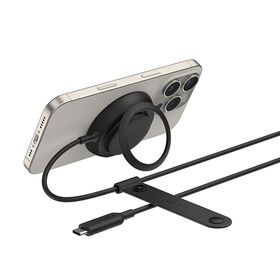
Belkin UltraCharge Magnetic Charger
Our top recommendation for this category
Price as of Feb 15, 2026 — see current price on Amazon.
In this guide
- Our top picks at a glance
- Best single-device charger: Belkin UltraCharge Magnetic Charger
- Best budget pick: Anker MagGo 2-in-1 Wireless Charging Stand
- Best for travel: Belkin UltraCharge 2-in-1 Foldable Charger
- Best premium 3-in-1: Twelve South HiRise 3 Deluxe
- Best for the Apple ecosystem: Belkin UltraCharge Pro 3-in-1 Dock
- Best desk power station: Baseus Nomos 5-in-1 Charging Station
- How to pick the right wireless charger
- The verdict
Wireless charging has changed a lot since those clunky, unreliable pads from a few years ago. Qi2 brought magnetic alignment to Android and iPhone alike, and 25W speeds mean you can actually top up your phone in a reasonable amount of time. No more placing your phone on a pad and coming back to find it at 12% because it shifted a millimeter.
This guide covers chargers from every major brand, and these are the ones that earn a spot on a desk (and nightstand).
Our top picks at a glance
| Charger | Type | Speed | Devices | Price | |
|---|---|---|---|---|---|
| Belkin UltraCharge Magnetic | Qi2 Puck | 25W | 1 | ~$35 | Check Price |
| Anker MagGo 2-in-1 Stand | Qi2 Stand | 15W | 2 | ~$28 | Check Price |
| Belkin UltraCharge 2-in-1 Foldable | Qi2 Foldable | 25W | 2+ | ~$80 | Check Price |
| Twelve South HiRise 3 Deluxe | MagSafe 3-in-1 | 15W | 3 | ~$130 | Check Price |
| Belkin UltraCharge Pro 3-in-1 | Qi2 Dock | 25W | 3 | ~$150 | Check Price |
| Baseus Nomos 5-in-1 | Qi2 Power Station | 15W | 5 | ~$90 | Check Price |
Best single-device charger: Belkin UltraCharge Magnetic Charger
Belkin UltraCharge Magnetic Charger
Pros
- Qi2 25W certified, genuinely fast wireless charging
- Built-in kickstand doubles as a phone stand
- Finger loop for one-handed use while charging
- Compact and lightweight for travel
Cons
- No included wall adapter at this price
- 15W max on older iPhones without iOS 26
- Not ideal for non-magnetic phones
Price as of Feb 15, 2026 — see current price on Amazon.
Belkin nailed the form factor here. The UltraCharge puck magnetically snaps to any Qi2 or MagSafe phone, charges at up to 25W (the fastest wireless speed available right now), and costs less than most people spend on lunch. The built-in kickstand means you can prop your phone up while it charges, perfect for video calls at your desk or following a recipe in the kitchen.
One thing to know: that 25W speed requires iOS 26 or a Qi2 25W-certified Android device. Older phones still charge, just at the standard 15W or 7.5W rates. If you have a phone without magnets, it still works as a flat pad, but you lose the snap-on alignment that makes Qi2 so reliable.
Best budget pick: Anker MagGo 2-in-1 Wireless Charging Stand
Anker MagGo 2-in-1 Wireless Charging Stand
Pros
- Adjustable magnetic angle for perfect viewing
- Charges phone + AirPods simultaneously
- Qi2 certified 15W fast charging
- Clean minimalist design disappears on your desk
Cons
- No wall adapter included (BYOA)
- 15W max, not 25W
- AirPods pad isn't magnetic
Price as of Feb 15, 2026 — see current price on Amazon.
Anker's MagGo stand is proof that spending more doesn't always mean charging better. For under $30, you get a Qi2-certified magnetic stand with an adjustable tilt that holds your phone at whatever angle you want. The base has a flat charging surface for AirPods or a second phone.
Qi2 magnets hold the phone on the stand, and the 15W charging speed is solid. No, it's not 25W fast, but for overnight charging or desk use, you won't notice.
The only real complaint: bring your own power adapter. Anker sells one separately, but most people have a spare USB-C brick lying around.
Best for travel: Belkin UltraCharge 2-in-1 Foldable Charger
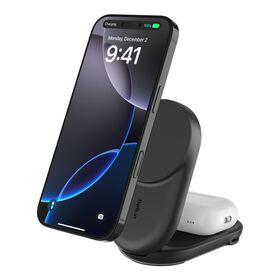
Belkin UltraCharge 2-in-1 Foldable Magnetic Charger
Pros
- Folds flat for travel, fits in a jacket pocket
- Qi2 25W on the main charging surface
- Bonus USB-C port for a third device
- 45W adapter and 5ft cable included
Cons
- $80 is steep for a charger without Apple Watch support
- Second pad is limited to 5W over USB-C
- No nightstand mode for Apple Watch users
Price as of Feb 15, 2026 — see current price on Amazon.
If you travel frequently and hate packing multiple chargers, this foldable design is the answer. It opens like a book: one side has a 25W Qi2 magnetic charger for your phone, and there's a USB-C port on the side for a watch, earbuds, or whatever else needs juice.
The whole thing folds to roughly the size of a compact mirror. Belkin includes a 45W wall adapter, which is a nice touch since most competitors make you buy one separately. The build quality feels premium, with a soft-touch finish that won't scratch your phone.
The catch: if you're an Apple Watch user, this doesn't have a dedicated watch charger. You'll want the 3-in-1 options below for the full Apple ecosystem experience.
Best premium 3-in-1: Twelve South HiRise 3 Deluxe
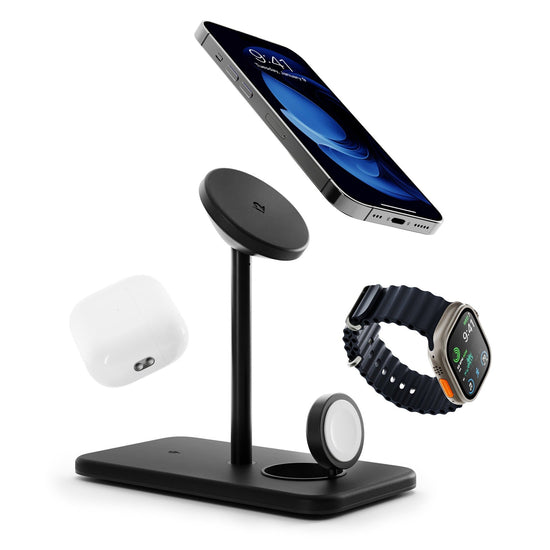
Twelve South HiRise 3 Deluxe
Pros
- Gorgeous design that looks like furniture, not tech
- Genuine Apple Watch fast charger built in
- Charges iPhone, Apple Watch, and AirPods simultaneously
- Tiny footprint takes up less space than your phone
Cons
- Apple ecosystem only (no Qi2 Android support)
- Expensive for a charger
- Requires the included power supply (no USB-C input)
Price as of Feb 15, 2026 — see current price on Amazon.
The HiRise 3 Deluxe is the wireless charger for people who care what sits on their nightstand. Twelve South has been making beautiful Apple accessories for years, and this is their masterpiece. The vertical design stacks your iPhone on top, Apple Watch in the middle (with a genuine Apple fast charger that tilts up for Nightstand mode), and AirPods on the base.
Build quality is noticeably better than mass-market alternatives. The weighted base prevents it from tipping when you grab your phone, and the soft materials won't scratch anything. It ships with international plug adapters, which is a nice bonus for travelers.
The obvious limitation: this is built specifically for Apple's ecosystem. Android users should look at the Belkin or Anker options instead.
Best for the Apple ecosystem: Belkin UltraCharge Pro 3-in-1 Dock
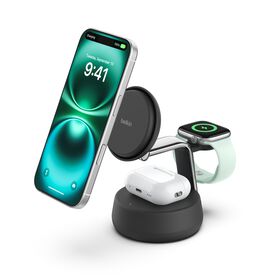
Belkin UltraCharge Pro 3-in-1 Magnetic Charging Dock
Pros
- Qi2 25W fast charging (fastest 3-in-1 available)
- Adjustable angle for the phone charger
- Apple Watch fast charger included
- Weighted base for one-handed phone pickup
Cons
- $150 is a lot for a charger
- Large footprint compared to foldable alternatives
- Overkill if you don't have all three Apple devices
Price as of Feb 15, 2026 — see current price on Amazon.
If you want the fastest possible wireless charging for your full Apple kit, Belkin's UltraCharge Pro dock is the one to beat. The 25W Qi2 phone charger is the fastest in any 3-in-1 dock, and the adjustable angle lets you use your phone in portrait or landscape while it charges.
Its Apple Watch charger supports fast charging (0-80% in about 45 minutes), and the base pad handles AirPods or any Qi-compatible earbuds. The weighted base is heavy enough that magnetically lifting your phone off doesn't drag the whole dock with it, a problem cheaper docks struggle with.
At $150, this is the most expensive option on the list. But if you're charging three Apple devices every night, the convenience and speed make it worthwhile. The $2,500 Connected Equipment Warranty from Belkin is a nice safety net, too.
Best desk power station: Baseus Nomos 5-in-1 Charging Station

Baseus Nomos 5-in-1 Charging Station (140W)
Pros
- Charges up to 5 devices simultaneously
- 100W retractable USB-C cable for laptops
- Qi2 15W magnetic wireless pad on top
- Compact design consolidates desk clutter
Cons
- Wireless charging tops out at 15W, not 25W
- Retractable cable can be finicky
- No Apple Watch charger
Price as of Feb 15, 2026 — see current price on Amazon.
The Baseus Nomos solves a different problem than the other chargers on this list. Instead of just charging your phone, it replaces the tangle of cables and adapters on your desk. A Qi2 magnetic pad on top handles your phone at 15W, while three USB-C ports (one at 100W via retractable cable) and a USB-A port handle everything else: laptop, tablet, earbuds, whatever.
The 100W retractable USB-C cable is the star feature. Pull it out to charge your MacBook, and it retracts flush when you're done. No more cable spaghetti. The whole station is about the size of a coffee mug, which is impressive given how much power it delivers.
The wireless charging tops out at 15W, not the 25W that Belkin offers. For a desk charger that stays put all day, that's rarely a meaningful difference. You're not staring at your phone waiting for percentages to climb.
How to pick the right wireless charger
Qi2 vs. MagSafe vs. Qi, what's the difference?
Qi is the original wireless charging standard. It works, but phones can shift on the pad and charge slowly or not at all.
MagSafe is Apple's magnetic version. It snaps your iPhone into perfect alignment every time and charges at up to 25W on newer models.
Qi2 is the new universal standard that brings MagSafe-style magnets to everyone, iPhones and Android phones like the Pixel 10 series. The latest revision, Qi2 25W (also called Qi2.2), bumps speeds from 15W to 25W.
If you have a recent phone, get a Qi2 charger. It works with everything and future-proofs you for faster speeds as more phones support 25W.
How much speed matters
Here's the honest truth: for overnight charging, even a 7.5W charger is fine. You're asleep for 7+ hours. Speed only matters if you're topping up during the day between meetings or before heading out.
For reference, rough charge times from 0% on an iPhone 16 Pro:
- 25W Qi2: ~90 minutes to full
- 15W Qi2: ~2.5 hours to full
- 7.5W Qi: ~4 hours to full
Single vs. multi-device
If you just need to charge your phone, save money with a single charger like the Belkin UltraCharge puck or Anker MagGo stand. If you have an Apple Watch and AirPods too, a 3-in-1 dock pays for itself in convenience and reduced cable clutter.
Cases and compatibility
Qi2 chargers work through most phone cases up to about 3mm thick. If you have a thick rugged case, you might need to remove it. Cases with built-in magnets (like those from Moment or Peak Design) work perfectly with magnetic chargers. If your case doesn't have magnets, stick-on magnet rings are cheap and work fine.
Frequently asked questions
- Do wireless chargers damage your battery?
- No. Modern phones manage heat and charging speed automatically. Wireless charging generates slightly more heat than wired, but phone manufacturers account for this in their battery management systems. Your battery will be fine.
- Can I use a Qi2 charger with an older phone?
- Yes. Qi2 is backward compatible with Qi. Older phones won't magnetically align or charge at 25W, but they'll still charge at whatever speed they support (usually 7.5W-15W).
- Is 25W wireless charging actually faster than plugging in?
- Not quite. USB-C wired charging can hit 30-45W on most phones, and some Android phones support 65W+. Wireless is about convenience, not raw speed. That said, 25W wireless is fast enough that you can go from 20% to 80% during a lunch break.
- Do I need the charger brand to match my phone?
- No. Qi2 is a universal standard. A Belkin charger works with Samsung, Google, Apple, and any other Qi2-compatible phone. The only exception is some MagSafe-specific chargers that are designed exclusively for iPhones.
- Why are some chargers so much more expensive?
- You're paying for: (1) faster charging speeds, (2) multi-device support, (3) build quality and materials, and (4) included accessories like wall adapters. A $15 charger will charge your phone. A $130 charger will charge three devices, look great on your desk, and come with everything in the box.
The verdict
For most people, the Belkin UltraCharge Magnetic Charger at ~$35 is the sweet spot: 25W fast charging, magnetic alignment, and a built-in kickstand. If you're budget-conscious, the Anker MagGo 2-in-1 does the job for under $30.
If you're all-in on Apple, the Twelve South HiRise 3 Deluxe is worth the splurge for build quality and design. And if your desk looks like a cable factory, the Baseus Nomos consolidates everything into one tidy station.
Check out our best power banks for 2026 if you need charging on the go, or our best USB-C hubs for desk setup accessories. For the latest smartphones to pair with these chargers, see our best budget smartphones and best smart watches roundups.
How We Pick
We pick products by combining spec-level research, price checks, trusted third-party benchmarks, and owner sentiment from high-signal sources.
- Performance and real-world value in the category this guide targets
- Price-to-performance and deal consistency over recent pricing windows
- Build quality, reliability patterns, and known long-term issues
- Recommendation refresh cadence to keep these picks current
Author
TheTechSearch Editorial Team
Independent product reviewers & PC builders
We compare real-world specs, reviews and owner reports, price trends, and user feedback to recommend gear that actually makes sense to buy.